

- Official Post
Description
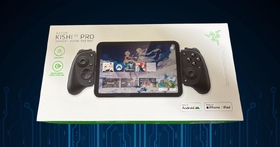
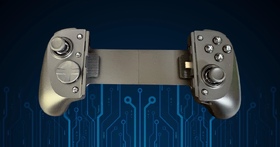
- FULL SIZED CONTROLLER FORM FACTOR — Console performance meets mobile convenience; play for extended periods in complete comfort and control with larger ergonomic handles that feel more natural to hold than standard mobile controllers
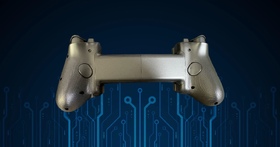
- FITS PHONES, IPAD MINI & ANDROID TABLETS UP TO 8" — Game on a phone or go even bigger; get a viewing experience worthy of the best AAA games with an innovative telescopic bridge that fits iPad mini and Android tablets up to 8 inches
- FULL SIZED TMR THUMBSTICKS WITH SWAPPABLE CAPS — Perfect your aim with high-precision, anti-drift thumbsticks that are superior to Hall Effect designs; customize them for more speed or precision with 2 swappable caps
- DUAL MOUSE CLICK BACK BUTTONS & CLAW GRIP BUMPERS — Enjoy the same ultra-responsive actuation found in our top gaming mice with 2 back buttons built into the controller’s ergonomic handles—topped with 2 claw grip bumpers for even more control
- POWERED BY THE RAZER NEXUS GAME LAUNCHER — Launch games, customize controls, record and share gameplay, and keep the controller updated with a free* app that can be brought up at the touch of a dedicated button. (*Razer Nexus does not require a fee/subscription, however some apps within Razer Nexus do)
- WIRED & REMOTE PLAY FOR PC — Turn the Kishi V3 into a haptic PC controller via a direct low-latency USB C connection (cable sold separately) or remote play PC games from any launcher with Razer Nexus and enjoy AAA gaming anywhere
- UNPARALLELED CASE COMPATIBILITY — Fits many popular phone cases thanks to an innovative USB C ‘island’ design and thicker depth clearance than other controllers
- RAZER SENSA HD HAPTICS — Feel every action and be immersed in every moment with high-fidelity haptics that are stronger, more detailed, and more nuanced than traditional console controller vibrations (Requires Android 12 and above or Windows 11; not currently supported on iOS)
- SEAMLESS CONNECTIVITY AND CONVENIENCE — Enjoy low-latency gaming and smooth audio with plug-and-play convenience; power the device while gaming with passthrough charging
- 3 FREE MONTHS OF APPLE ARCADE — Enjoy 3 free months of Apple Arcade with purchase; the Apple Arcade offer will be provided directly through the Razer Nexus app (new and qualified returning subscribers only) - $6.99/month (in the US) after free trial; prices vary by region; plan automatically renews until cancelled
My Opinion
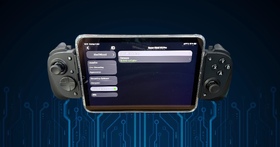
So from the description side all sounded very great and perfect and so I ordered my device for my iPad Mini (gen 7). I must say after some testing my feeling are very sobering. Here why:
Like mentioned I used an iPad Mini for my testing as my Android tablet is very very old (Huawei Media Pad with only 64GB of space). First I tested my usual games to find out that if the game doesn't support controllers you are very fucked up on iPad. The the onscreen mapping simply doesn't exist here.
So I was looking for games supporting controller and ended up with Diablo Immortal and Titan Quest with OpenTyrian for the future.
First of all Diablo Immortal works so far so well with the controller as long as you play your character, As soon as you need to move trough the menu or change your skills, your equipment and so on you can forget it. You automatically swap back to the touch screen as it is easier to handle. But on the game site, for moving your char it's great. I just don't understand why they put the B button for fighting and the A for interacting but at least you can swap them in the game settings.
Moving over to Titan Quest it was a totally different experience. Why? Well the game is more build for controller and it swaps to a specific interface for it. You can always use the touch screen and as soon as you move again with the controller it simply swaps to that interface. I must say till now I had much fun with it.
The third game I wanted to test was OpenTyrian but unfortunately there is an existing bug that let the controller not move one step forward in the menu but 2 - this isn't the case when testing with my iPhone but that wasn't the goal for this controller.
I also tested some racing games like Asphalt but racing games are nothing for me. The next wall is always mine lol 
Than I wanted to adapted the told possible to edit additional buttons at the back as example. Boah I was so disappointed. I wanted as example for my games to map the letter m from the keyboard to the M1 button - but no - this is not possible. You can map it to some buttons but not free to what ever you want... I don't know yet but maybe also an iPad restriction?
- Easy to setup
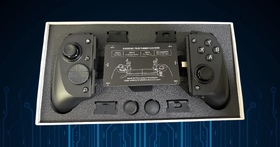
- Adapters for different kind of devices (I mixed up one with some manual added extension holder for my iPad due to my case
- Stick feels very good
- No pain in my hands even after several hours of gaming
- Not to heavy
- Some features simply don't exist under iOS
- Games need to be added manually to Razer Nexus (all of them!!)
- I have the feeling that the A,B,X and Y buttons are a bit noisy but this might be just my opinion
- It feels a bit wobbly when an iPad is in the controller compared when an iPhone is in it
URL
Media
|
| |
|
|
|